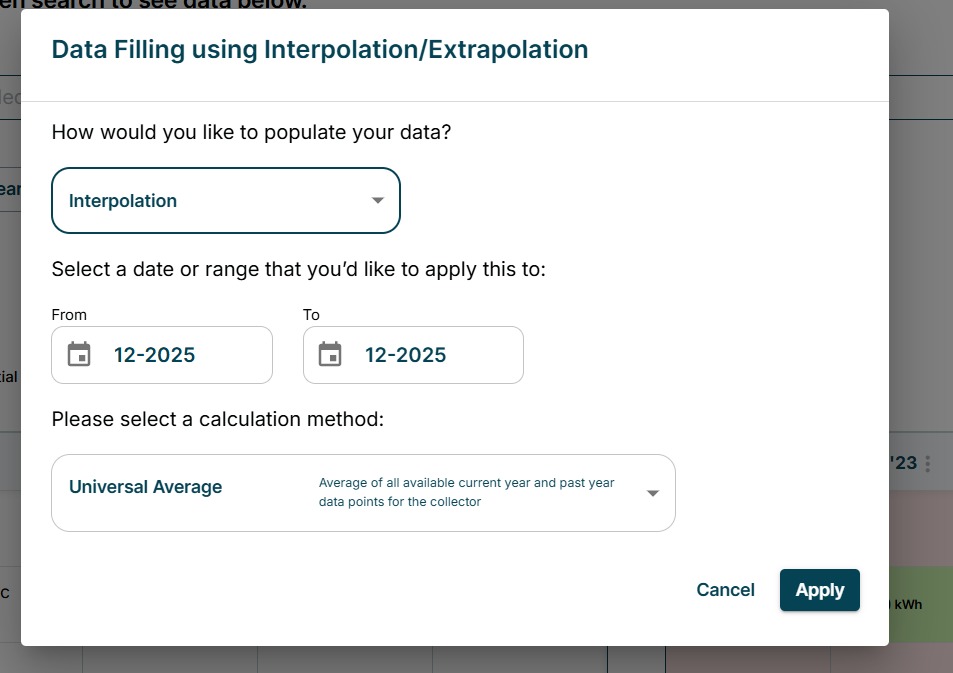
To determine if there are gaps in your data, navigate to Documents, Check Missing page. Once in the page, you can filter the year, site or utility type you are curious about. If data is missing, red boxes will appear.
If you do not have bills to fill in the data, there are 3 ways to fill in the data:
-
Making Parameter Based Estimates. This method is used when usage data is unavailable.
Monthly Estimation: Tracera enables monthly utility consumption estimations based on standardized parameters. These estimates are automatically generated in the system on the 5th day of each month.
Required Input Fields: Users must provide the following information to generate a parameter-based estimate:
- Utility Type (e.g., electricity, natural gas)
- Estimation Method: Based on either:
- Headcount
- Site Area (in ft² or m²)
- Estimation Value: Numeric input aligned with the chosen estimation method (e.g., total area or number of employees)
- Estimated Usage per Day: Average utility consumption per square footage or per headcount
- Example: Average kWh per m² per year for office buildings
- Usage Unit: Unit of measurement (e.g., kWh, therms)
- Start and End Dates: Defines the period over which the monthly estimations will apply
Assumptions
- Operational Days: For parameter-based estimations, Tracera assumes an average of 21 operational days per month. This is based on a standard five-day operating week over 52 weeks per year, adjusted for 11 U.S. federal holidays:
(52×5)-11=249 operational days per year
249÷12=20.75 ≈ 21 operational days per month
- This assumption provides a consistent and practical basis for estimating monthly activity data for facilities operating on a typical weekday schedule.
Estimation Sources
- The default source that Tracera uses for parameter-based estimations is the 2018 Commercial Buildings Energy Consumption Survey (CBECS), provided by the U.S. Energy Information Administration (EIA): https://www.eia.gov/consumption/commercial
-
The third method utilizes Spend-based estimation. Spend-based estimation calculates utility consumption using the average consumption per unit of currency at the country level. This method is typically used when invoices do not include direct consumption values, but only total utility expenditure.
The Tracera Platform automatically determines the average utility consumption per unit of currency for each country.
Required Input fields
- Invoices in Tracera that include utility expenditure (without consumption data).
- Country-level average utility consumption per unit of currency, as calculated by the Tracera Platform.
Calculation method
-
Unit Cost Estimation – This approach requires historical unit cost data for the specific utility provider.
-
Based on the country of the provider, the system retrieves the median unit cost per kWh from available utility providers in that country.
-
The unit cost data is derived from historical records within Tracera.
-
The final method enables users to estimate emissions by using the average of all current and previous year data points for the collector.
- Navigate to the Documents, Check Missing Page
- Filter to the year or site that contains missing data.
- Select the red box for the month that data is missing
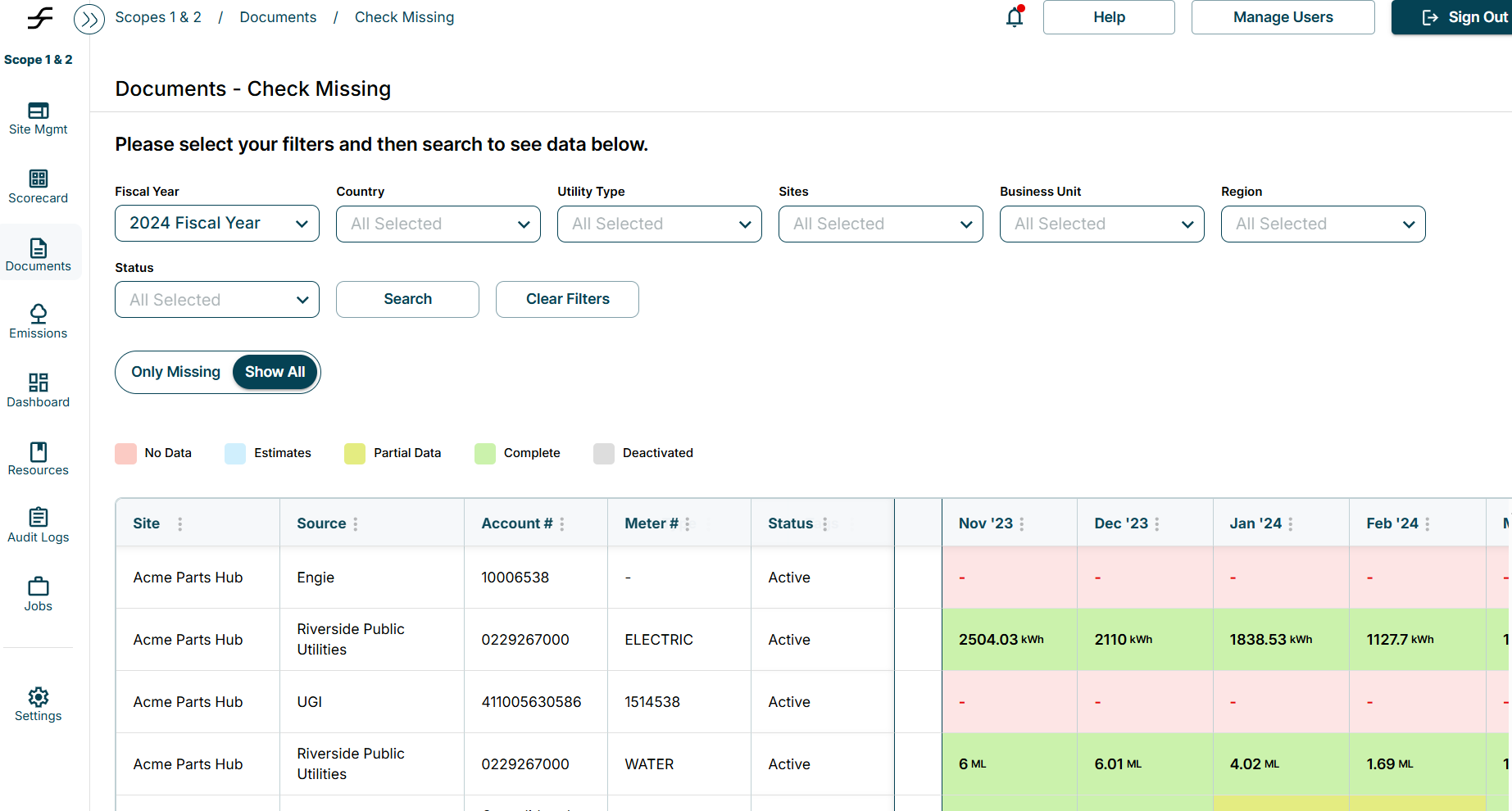
- Under “How would you like to populate your data?
- Select: Interpolation
- Enter the appropriate date range for that month
- Under “Please Select Calculation Method”
- Select “Universal Average
- Hit Apply